Mount Parashka
Turkey 2011
Review of Garmin Etrex Vista HCx. The choice of maps, a connection to OziExplorer
In this article I will try to describe the questions and solutions that I have encountered in selecting, purchasing and using of GPS-navigator.
Which GPS receiver to choose (in the line of Etrex)?
It will help the scheme ( source ):
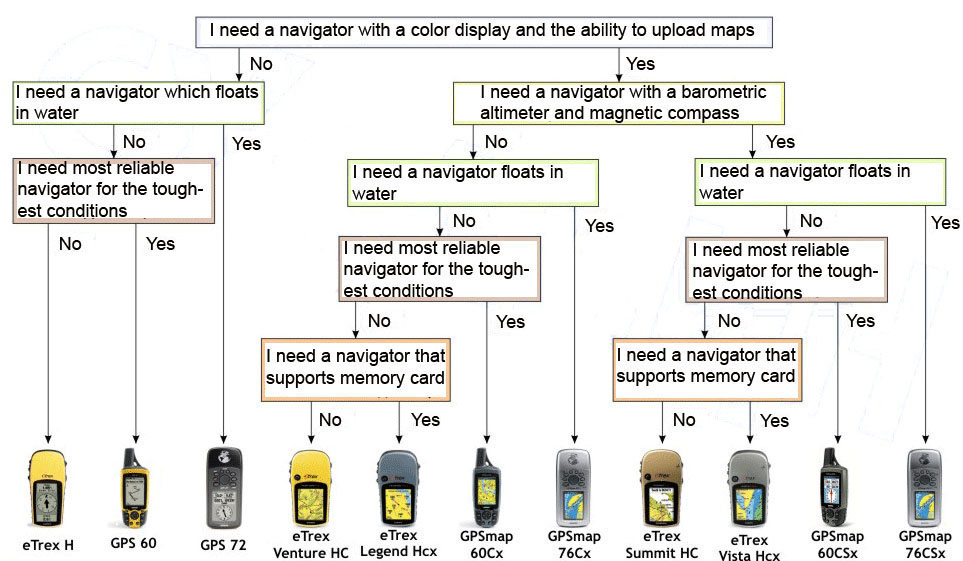
As well as decoding of alphabetic indexes:
H - series which is promoted as receivers with higher sensitivity and a new processor;
C - color display;
x - support for memory cards microSD.
I chose the Etrex Vista HCx. It is better Etrex H by color display and map uploading support - it is a significant advantage for me, and better from Etrex Legend HCx by the presence of barometric altimeter and magnetic compass, which, in my opinion, is not essential, but still gives certain advantages for orientation.
Navigator was used for six months and performed well in different conditions. He really works well in the forest, train. One battery pack is enough for about 12 hours.
Among the drawbacks: strong enough "slows down" when searching for satellites in starting, and when scrolling maps by joystick.
Where to buy GPS-navigator?
In large cities, this is no difficulty. In Lviv, where I bought my device, there are also GPS shops, but there they are unduly expensive. Another alternative - tourist equipment and computer shops, particularly online retailers. You can also search in Internet auctions. Very interesting proposals are on eBay, this option is right for you, if you are familiar with the procedures of payment and clearance. My chose an online store.
Where to find the GPS-maps?
Etrex series does not support the format of OziExplorer and raster maps, so one can look for specific vector. Often, vendors offer them as a bonus.
In the Internet there are fairly paid and free maps. You can find them at website .
For Ukraine there are such maps:
- Aeroscan - the most detailed and best card of Ukraine for Garmin;
- NavLyuks - is slightly inferior to the previous;
- CarteBlanche - a very good selection of colors, but even less detail;
- Map of Ukraine with the relief by Aeroscan - it may already is a new version, but the version which I saw was just awful, but gives some idea of the relief.
For part of the Carpathians there is a good free map of the Carpathian .
points POI and contour lines of heights (horizontal lines, isolines) of the Carpathian .
Files of isolines for other regions can be found here .
After downloading, you have to "glue" them by the program GmapTool with any map in the IMG-format, then you will see contour lines in your map.
How to connect your device to OziExplorer?
With Garmin Etrex Vista HCx is included cable to connect it to your computer. It is usual adapter USB-miniUSB. One often need to load point and tracks from OziExplorer to device and vice versa.
I can not connect device with version 3.95.3s. In version 3.96.2a in configuration tools (File-> Configuration-> COM) is an option "Garmin USB", you just need to put a check mark and restart the program.
How to convert tracks from gpx to plt files and other formats?
In the Etrex Vista HCx tracks stored on a memory card in gpx-format. In order to convert them into a plt-format convenient for OziExplorer I use the program GPSBabel. You need to choose Input Format GPX XML, and the Output Format - OziExplorer. The program also supports many other formats.